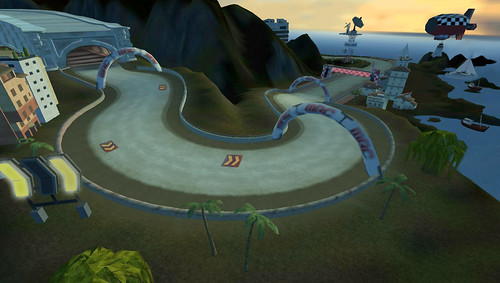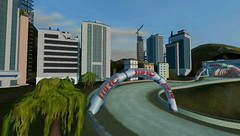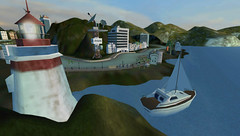

Welcome back to our ModNation Racers PSP Track Studio walkthrough! Today’s blog post brings us to the final installment of our tour of the Track Studio — Seaside Theme. Be sure to check out my previous post, where I created, painted and sculpted the track here. Or where I added a bunch of obstacles and dropped in Theme-based buildings here.
Here’s where we left off: I have the terrain sculpted and painted, I have my ocean setting all lined up and got the track obstacles placed and modified their Dynamic Options. Now all that’s left for me is to put the final layer of polish on this track. I want to give it that certain something that will help it stand out amongst the crowd of other great user-generated content. I’ve seen some of the creations that people have been able to make using the Track Studio tools, so I’ll need every advantage possible if I want to make the top five weekly downloads!
One of the things I like to do with a track is use the theme-based trees and plants to give it a unique feel. This being the Seaside Theme, I have the option of using some palm trees, rocky outcroppings and a bunch of different plants and bushes.
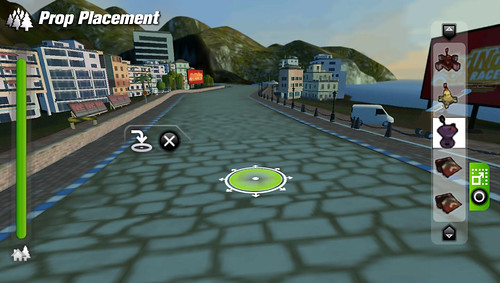
It’s important to remember that when someone is racing your track, they’re not in the default birds-eye view. For a good idea of what people will see, I can go into the Prop Placement screen and press the Select button. This will take me down to a Track View and allow me to preview what things will look like when I’m actually racing! This function is great for lining up buildings, or for seeing how the layout of your trees will look, or whether you’ll get a nice shot of the sunset while racing over a hill. I go into this camera mode frequently while building a track, so I can get the best possible idea of how my track will look from a racer’s perspective.
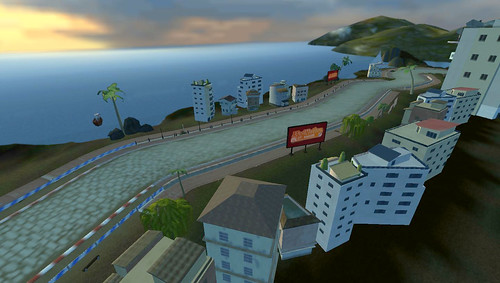
There! All the details are in place. I added some directional signs, threw in some more trees, picked a sky selection that works best for my track, and populated the rest of the track with more theme-based props.
I’m now ready to Test Drive this track. Test Drive allows you to save your track, then hit the asphalt to see how your drift lines look, how the obstacles are tuned and, of course, how good your track looks from the racing perspective!
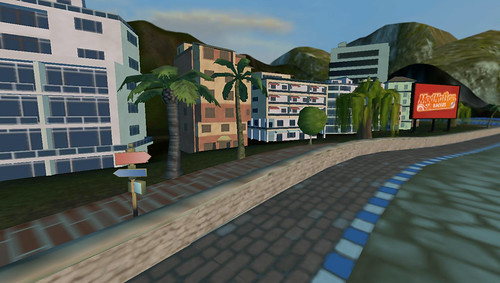
Yup! There it is! After about 15 minutes of creation and a few more minutes spent polishing the track to a shine, I’m now ready to share it with the rest of the ModNation world.
I hope you’ve enjoyed this Track Studio tour of one of the four themes available in ModNation Racers PSP. We’ve had a great time working on this game, so I hope you all have just as much fun playing it!
We’ll be hitting store shelves on May 25th, so start your engines and get ready to Race, Create and Share! I’ll see you on the track…









12 CommentsAdd Yours
1
Posted on 16 April, 2010 at 4:06 pm by Myst3rialP
Wow! Nice Track!
BTW, Great Editor – very creative, powerful. Seams easy to pickup!
2
Posted on 16 April, 2010 at 4:49 pm by BalramRules
I agree, WOW! XD
Never knew you could be this creative in ModNation Racers, it’s just like the pinball levels in LBP! =P
3
Posted on 16 April, 2010 at 5:32 pm by Joe382
This game is gonna be amazing. I can not wait!! Don’t know which pre-order bonus to go for though…
4
Posted on 16 April, 2010 at 5:35 pm by Joe382
oh woops I didn’t realise this was the PSP version because it looks so good! Any plans to bundle both versions for a discounted price?
5
Posted on 16 April, 2010 at 6:31 pm by mango1234
I need a PSP
6
Posted on 17 April, 2010 at 6:03 am by dvskywalker
Okay, so I think this is the same guy who wrote the error code 8001050F blog. I have the new, ‘slim’ version of the PS3 and I am now just experiencing the problem. Since that blog was from last month, I could no longer respond on that topic. Is it possible my PS3 has a virus, or is it just more technical difficulties? Please, somebody, help me with this. I am hoping the problem self corrects, so… yeah. I will be very sad if it isn’t fixed within the next week.
7
Posted on 17 April, 2010 at 9:26 am by Ragnarok-NZ
@dvskywalker – first off try asking for this error on your own country’s Blog region [blog.us.playstation.com]
Secondly, that error should’ve been addressed with the latest firmware – however, I have seen that error number on my Own ps3 and it seemed to fix itself as it had something to do with my ISP and some error they were experiencing with their Internet servers.
Perhaps you need to reset or update your router’s firmware?
If not, I recommend contacting your nearest Sony Service station for more details as this is just a blog for gaming related information and not a Q&A for technical difficulties regarding the PS3.
Good luck, and I hope your problem gets resolved soon
8
Posted on 17 April, 2010 at 11:44 am by Wiiman1225
Sony, Every gameshop (Game, Amazon, Play.com, Hmv, ETC) is saying that Modnation racers is out May 21 2010. Is this the true UK retail date?
If, you can, repay back?
9
Posted on 17 April, 2010 at 5:48 pm by Joe382
Wiiman1225 that release date is official, may 21st.
10
Posted on 17 April, 2010 at 6:08 pm by Wiiman1225
Thank You Joe382, Thanks a lot!!!!
11
Posted on 18 April, 2010 at 10:34 am by xmodnationx
ok does everybody agree that we need some game play videos of the PSP VERSION of mod nation racers …. i mean com on the PS3 has more than 85 vids and the psp has like 1 video… i wanna c what the mod spot looks like on the psp i wanna c some kart customization on the psp .. i wanna c an story mode race on the psp…and most important..
I WANT A FREAKIN DEMO SO WE CAN PLAY IT..CAUSE THE PS3 HAD A BETA…
thats all sorry for the bad english XD
12
Posted on 18 April, 2010 at 10:38 am by xmodnationx
o yeah one more thing about the psp version if you drift .. will your wheels start flaming like the ps3 version..
We close the comments for posts after 30 days. If you would still like to comment on this post, please use our contact form.