

With the PlayStation Store back online, we’ve been getting all caught up this week, having launched an abundance of amazing content for download on PlayStation 3 and PSP. Today, we’re excited to launch the Welcome Back program to thank you for your loyalty and below we’ve detailed what is available, how to go about downloading it and a list of frequently asked questions.
Thanks again for your patience and understanding as we restored the PlayStation Network and Qriocity services – your support has meant a lot to us and is greatly appreciated.
Q: What’s in the Welcome Back Program?
A: To start, all PSN members who had signed up before the outage (April 21, 2011) will be able to select two free games for the PS3 and two free games for the PSP.
For PS3 owners, go to the ‘Welcome Back’ section in the PlayStation Store, and select 2 titles from the following list:
- Dead Nation
- inFAMOUS
- LittleBigPlanet
- Ratchet & Clank: Quest for Booty
- Wipeout HD + Fury
For PSP owners, go to the ‘Welcome Back’ section of PlayStation Store on your PSP system and select 2 titles from the following list:
- LittleBigPlanet (PSP)
- ModNation Racers
- Pursuit Force
- Killzone Liberation
*For the German market, InFamous and Dead Nation will be replace with Super Stardust HD and Hustle Kings in the selection of PS3 games. Pursuit Force and Killzone Liberation will be replaced with Everybody’s Golf 2 and Buzz Junior Jungle Party in the selection of PSP games. Killzone Liberation will not offer online gameplay functionality.
How to claim your free games
- Go to PlayStation Store from the XMB
- Click on the Welcome Back banner on the Storefront or the Latest tab
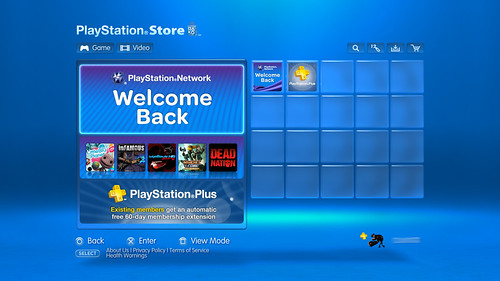
- Go into the Welcome Back category and select the ‘PlayStation 3 Free Games’ item, and then select ‘Get Now’ on the following screen
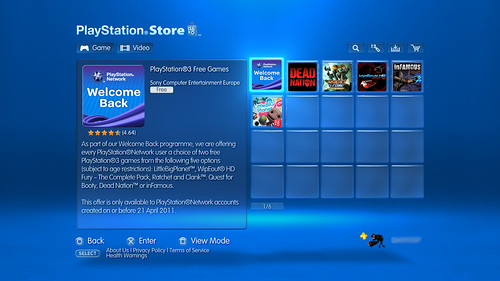
- You will be taken back to the Welcome Back section where you will be able to select your two free games
- These instructions are applicable to both PS3 and PSP
In addition, we’re giving free access to our premium subscription service, PlayStation Plus, which includes free games, huge discounts, exciting exclusives and added features like online storage and automatic downloads, to all PSN members for 30 days at no charge, requiring no long term commitment. As with the games above, go to the PlayStation Store and under the ‘Welcome Back’ section, select ‘PlayStation Plus: 30 Days Free’, and you’ll be given access to all of the benefits of PlayStation Plus. Note that this will not auto-renew and simply expires 30 days after activation.
Current Plus subscribers had an extra 60 days added to their existing subscription at no charge. For current Plus subscribers, no action is needed as the 60 days have automatically been added to your subscription. Another additional 10 days will be added to your subscription in a few days’ time.
PlayStation Network users will also get a large number of free virtual items in PlayStation Home as a show of appreciation for your patience while Home was inaccessible. More information and will be available in the near future, so watch out for any announcements from the PlayStation Home team.
A selection of “On Us” movie rentals are currently available to PlayStation Network customers this weekend only, where Video Service is available.
Finally, current Music Unlimited Premium subscription members will receive an additional 60 days of free premium subscription. Any Music unlimited free trial users who were affected by the outage will receive 30 days of service.
Q: When will I have access to the Welcome Back Program?
A: The content offered as part of the Welcome Back Program is available for download today and will be available for 30 days.
Q: I have both PS3 and PSP. Does this mean I will get 4 games all together?
A: Yes, as long as you were a PSN member before April 20, 2011, you’ll be able to receive up to 4 games based on the titles listed above; 2 on each platform.
Q: Are there any limitations to the PS3 and PSP games we are receiving for free as part of the Welcome Back Program?
A: None. These games are yours to keep.
Q: I no longer have the option to choose my free Welcome Back games. What can I do?
A: If you navigate away from the Welcome Back section of the store without choosing your free games or exit the store completely you may need to follow the below in order to choose and download your free games.
- On your PlayStation 3 or PlayStation Portable navigate to the PlayStation Network icon on the XMB
- Log into your PlayStation Network account and choose Account Management > Transaction Management > Services List
- Choose “PlayStation Network Promotions” from the list of services displayed
- Select either “PS3 Free Games” or “PSP Free Games” and then choose “Select Content”
You will be taken to the store to choose your remaining free games.
Q: When does the 30 days of my PlayStation Plus access expire?
A: Your PlayStation Plus 30 day access will expire 30 days from the date you activated it in PlayStation Store.
Q: Do I get to keep the free games in PlayStation Plus forever?
A: Content that is free in PlayStation Plus will not be available after your PlayStation Plus time has expired. However, if you decide to join PlayStation Plus, you’ll have access to all of the content you downloaded during your 30 day access for as long as you are a subscriber.
Q: Do I get to keep any games or content I purchased with the PlayStation Plus discount?
A: Yes. Any content you purchase at a discount is yours to keep, regardless of your subscription status.
Q: What content will be in PlayStation Plus when I activate my 30 days?
A: A full list of available PlayStation Plus content and discounts for our Welcome Back customers was detailed on the blog earlier this week.
Q: Where can I find the Welcome Back content in Home?
A: We are still putting our Welcome Back content for Home together and will communicate this soon. Check back here for more details – our aim is to give away content that has not been available before.
Remember, if you didn’t see your question answered above, drop us a line below and we’ll do our best to answer it. Welcome Back!



1 2 … 31 Next »
1,545 CommentsAdd Yours
1
Posted on 3 June, 2011 at 5:54 pm by vicheous
I already got all these games! But free + for a bit is okay
2
Posted on 3 June, 2011 at 5:57 pm by xiiNeoNz
WOOOOOOOOOOOOOOOOOOOOO
3
Posted on 3 June, 2011 at 5:57 pm by vherostar
wooooo thanks for these
4
Posted on 3 June, 2011 at 5:58 pm by flamingcarrot
Great stuff. Cheers guys.
5
Posted on 3 June, 2011 at 5:58 pm by Pacman_Ownage
Blimey, the UK actually seemed to get the raw deal for once… our video selection is clearly the worse out of the packages
Step Brothers <3
6
Posted on 3 June, 2011 at 5:58 pm by sowasred2012
Thanks guys! Looking forward to getting my hands on Dead Nation and Infamous!
7
Posted on 3 June, 2011 at 5:58 pm by Adielr
You forget to mention that free add-ons from Plus also stay after the subscription period.
8
Posted on 3 June, 2011 at 5:58 pm by slinkymcpot
good but where is the maps for call of duty answer us please james
Posted on 3 June, 2011 at 6:06 pm by James Gallagher
We’re working with Activision now to find out get that news on here. Bear with us, please. There is a lot happening.
9
Posted on 3 June, 2011 at 5:59 pm by SavingHumanity
When will we be able to buy escalation?
10
Posted on 3 June, 2011 at 5:59 pm by Stocko
SICCCCKKKK WIPEOUT CANT WAIT TO PLAY
!
Cheers SONY!
11
Posted on 3 June, 2011 at 6:00 pm by spikkle
THANK GOD.
12
Posted on 3 June, 2011 at 6:00 pm by rymanb
Are we free to redeem the free games and PS+ whenever we want, or is there a deadline?
13
Posted on 3 June, 2011 at 6:01 pm by DBcoopmore
YEAH! MEGA-THANKS!
14
Posted on 3 June, 2011 at 6:01 pm by link1983
Lol, Trust me to have a problem. I have selected the little blue Icon and downloaded whatever that was. Then I went to select the wipeout bundle and realised I hadn’t deleted the Wipeout HD from my HDD. So I exited the store deleted wipeout and returned to find all of the gaming icons missing????????? I cannot download any of them now?
Posted on 3 June, 2011 at 6:03 pm by James Gallagher
Try this:
1. On your PlayStation 3 or PlayStation Portable navigate to the PlayStation Network icon on the XMB
2. Log into your PlayStation Network account and choose Account Management > Transaction Management > Services List
3. Choose “PlayStation Network Promotions” from the list of services displayed
4. Select either “PS3 Free Games” or “PSP Free Games” and then choose “Select Content”
15
Posted on 3 June, 2011 at 6:01 pm by Carl-G
COOOOOOOOOOOOOL! ! !
Now people can stop MOANING now
16
Posted on 3 June, 2011 at 6:01 pm by rymanb
Sorry, that was me not reading the text properly
17
Posted on 3 June, 2011 at 6:02 pm by michaeltk77
James, my PS3 arrived the day the PSN was taken offline. Any chance to be added to the eligible people?
18
Posted on 3 June, 2011 at 6:02 pm by slinkymcpot
maps news please
19
Posted on 3 June, 2011 at 6:03 pm by BADDOG-9
if i already have all thos games can i get something els ?
20
Posted on 3 June, 2011 at 6:03 pm by nuttaone
Ok what about Black Ops Escalations Map pack?
21
Posted on 3 June, 2011 at 6:05 pm by Dr_Ethanol
You still don’t answer to a important question for all the psp owner, why media go don’t work to copy the psp game from PC to PSP ….
Posted on 3 June, 2011 at 6:38 pm by James Gallagher
I’m afraid I don’t have an answer to that but I have raised the issue to the engineers.
22
Posted on 3 June, 2011 at 6:05 pm by GarryKE
I now love you more than ever before. <3
23
Posted on 3 June, 2011 at 6:06 pm by Carl-G
+ i know this question is not for europe owners but the Japanese PSN Store is still down? + the Chinese PSN + Store still seems to be down?
[i am not moaning at that tho, just saying, well i got Japanese + Chinese Accounts to]
24
Posted on 3 June, 2011 at 6:06 pm by Mike939
I think i’ve come across an error, I accidently clicked on inFamous twice and now I cant get another game
Posted on 3 June, 2011 at 6:16 pm by James Gallagher
See my comment above and try following those instructions.
25
Posted on 3 June, 2011 at 6:06 pm by Ti_dus
Thank you guys! Sony is amazing
26
Posted on 3 June, 2011 at 6:07 pm by Wraxend
Nice one. Plenty of time to complete Infamous before Infamous 2 next week
27
Posted on 3 June, 2011 at 6:08 pm by link1983
Ah, Thanks very much. All works now.
28
Posted on 3 June, 2011 at 6:08 pm by Joe382
As I tried to download 1 free game it said I didn’t have enough hard drive space so I left the store and deleted some demos and then when I tried to download my second free game they had all dissapeared! So now I am unable to claim my other free game! HELP
Posted on 3 June, 2011 at 6:17 pm by James Gallagher
See the instruction in a reply to comment 14 and that should sort you out.
29
Posted on 3 June, 2011 at 6:08 pm by shaolinsword
LBP, Wipeout HD and Infamous 2 workshop for me this weekend then. Sounds like a goodun
30
Posted on 3 June, 2011 at 6:08 pm by Mike939
Same here joe but I thought it was because I clicked it twice
31
Posted on 3 June, 2011 at 6:09 pm by DylanSpronck
We have 3 accounts on one PS3: My moms, my sisters and mine. Does that mean we all get to choose 2 games or is it just 2 games per console?
32
Posted on 3 June, 2011 at 6:10 pm by Carnivius_Prime
I’ll take LBP and Infamous on PS3 as they’re the only ones I don’t have downloadable versions of even though I own all 5 games.
LBP and Modnation on PSP for me as I used to own the UMDs and I want to play these again and having them downloadable makes them sorta future proof on the non-UMD compatible NGP then I reckon.
Thanks for the freebies.
33
Posted on 3 June, 2011 at 6:10 pm by Azard300
YAAAAAAAAAAAY BOY!!!!!!!!!!!!
34
Posted on 3 June, 2011 at 6:13 pm by deltaman-3
PS STORE MELTDOWN SYSTEM ERRORS EVERYWERE…
35
Posted on 3 June, 2011 at 6:14 pm by gazzagb
What will happen to any of the free themes/avatars that I may download once my PS+ trial has finished? Will I lose them as well as any of the games?
Thanks.
36
Posted on 3 June, 2011 at 6:14 pm by Wizenthal
woho!:D finally a weekend full of infamous and LBP for me
thx sony!
37
Posted on 3 June, 2011 at 6:14 pm by Shifty_Geezer
HUZZAH!!
38
Posted on 3 June, 2011 at 6:15 pm by pedrodj41
Hope every one enjoys their free games i all ready did when i bought them ALL on release
39
Posted on 3 June, 2011 at 6:16 pm by Stewyc12
“Try this:
1. On your PlayStation 3 or PlayStation Portable navigate to the PlayStation Network icon on the XMB
2. Log into your PlayStation Network account and choose Account Management > Transaction Management > Services List
3. Choose “PlayStation Network Promotions” from the list of services displayed
4. Select either “PS3 Free Games” or “PSP Free Games” and then choose “Select Content”
I’ve tried that and it say’s games remaining 0, I’ve only downloaded 1
Posted on 3 June, 2011 at 6:35 pm by James Gallagher
hmm, that’s not good. I’d say first check your download list in account management to see if you selected a second game without realising. If not, I’m afraid there’s not much I can do from here and you’ll need to call customer services.
40
Posted on 3 June, 2011 at 6:17 pm by slinkymcpot
thanks for the info james try to hurry it up tho plz dying to play call of the dead
41
Posted on 3 June, 2011 at 6:17 pm by nuttaone
I can see the 5 available games to the left but when pressing X does nothing… why can’t i even select the games?
42
Posted on 3 June, 2011 at 6:19 pm by SGTSTEELFACE
James what if the ps3 has two psn accounts can we get both games
43
Posted on 3 June, 2011 at 6:19 pm by DBcoopmore
Streets of rage 2 with trophies… brilliant
44
Posted on 3 June, 2011 at 6:20 pm by the1free_man
Hi James! Awesome stuff, thanks! I have just one question. Say I don’t have enough space on my mem card in the psp for two games. Can I “get” the games now, but actually download them at a later date when I buy a big enough card?
Posted on 3 June, 2011 at 6:37 pm by James Gallagher
Yes, choose them now and they will be in your download list for when you have a bit more space.
45
Posted on 3 June, 2011 at 6:20 pm by OrderSora
Well I’m facing errors when trying to access the PS Store, likely because EVERYONE is trying to download at the same time!
Because of this, when I try to go to the “Welcome Back” section, it says that no content was found, guess i’ll try later when things cool down a bit. xD
Enjoy the games and the the free content guys.
46
Posted on 3 June, 2011 at 6:21 pm by iriihutoR48
I got some sort of error message when clicking the ‘Get now’ icon and now when I click on the ‘Welcome back’ banner, all it shows me is the PS+ icon. There is supposed to be a ‘Welcome back’ icon beside the PS+ one but it has disappeared.
These Welcome Back gifts are way too much anyway but I hope it gets fixed.
Posted on 3 June, 2011 at 6:41 pm by James Gallagher
Try accessing your services list as detailed in a comment above.
47
Posted on 3 June, 2011 at 6:22 pm by acousticguy92
It seems that the option to purchase the “PlayStation 3 Free Games” item is no longer there. Why is this so? Please reply!
Posted on 3 June, 2011 at 6:41 pm by James Gallagher
If you accessed it once then went back out again, it may have disappeared. Try following the steps I’ve mentioned in a comment above to check your services list and get back in.
48
Posted on 3 June, 2011 at 6:22 pm by nuttaone
I’ve managed top get PS+ but no option to select games?? Any ideas?
Everything to the left is ‘unclickable’
49
Posted on 3 June, 2011 at 6:24 pm by LOLiFAIL
Well I just tried to download my games and I got “These are not availble at this time” or something similar so I back out to try again and now they’re not even on the list!? Sort your [removed] out sony.
50
Posted on 3 June, 2011 at 6:24 pm by steveeire
it won’t let me download anything, is anyone else getting this problem?
1 2 … 31 Next »
We close the comments for posts after 30 days. If you would still like to comment on this post, please use our contact form.