

If you’ve picked up a PlayStation Vita this week then you’ve probably been too busy playing your way through the incredible launch line-up to have spent much time browsing the Settings menu. Luckily, you don’t need to – I, along with the US PlayStation.Blog team, have spent plenty of time playing with the hottest new handheld on the market and we have put together a few tips and tricks figured out after extended play.
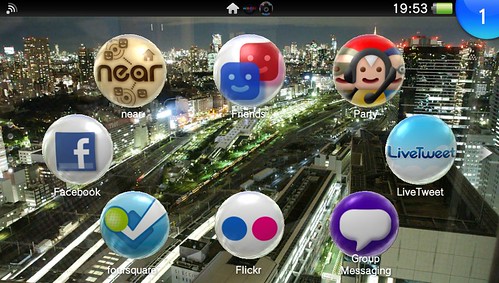
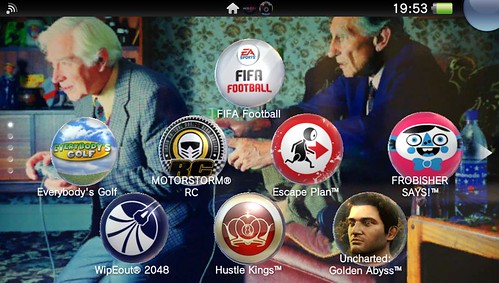
1. Order in the court! By now, you’ve probably figured out how to move your game and app bubbles around the Home Menu by pressing and holding one using the front touchscreen, enabling you to drag it around into different frame. You can even change the background color or image by tapping the theme icon in the bottom right of each frame. Get creative and design your own background images (which you can transfer to your PS Vita via PS3) like I did here.
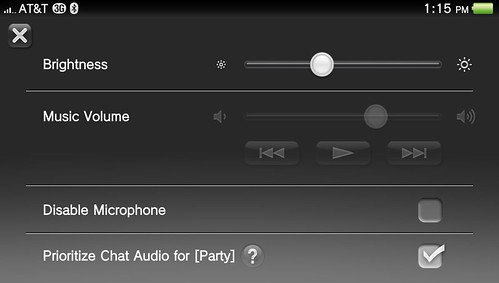
2. Let there be light. You can adjust your PS Vita’s OLED screen brightness mid-game without the hassle of jumping into the Settings menu. Just hold the PS button to bring up a quick-access menu that enables you to adjust brightness and your custom music options. Wanna listen to the soundtrack to Armageddon while carving through Ninja Gaiden Sigma Plus? Don’t miss a thing, baby.
3. Call for backup. Let’s face it: electronic devices have an uncanny affinity for toilets. We can’t prevent that, but we can help ensure you don’t lose your precious saved game data. Simply connect your PS Vita to your PS3 via the USB cable, open up the Content Manager on your PS Vita, and select the the Back Up option to back up all your PS Vita’s game data and gain a little extra peace of mind.
4. Say cheese! PS Vita comes equipped with a simple but game-changing new feature: The ability to snap screenshots of your in-game exploits. Just press the PS button and Start at the same time: You’ll see a white flash and hear the snap of a camera shutter and the resulting image will be saved and neatly categorized in your Photos gallery. You’ll be able to take screenshots in the vast majority of games, though not every game.
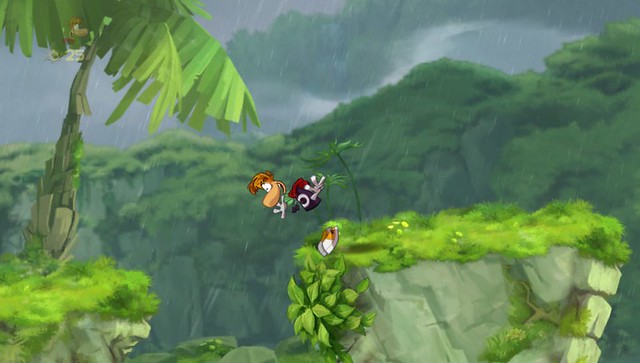
5. Prettier PSP games. PS Vita currently supports more than 275 legacy digital PSP games and more are on the way. You can also improve the way those lower-resolution PSP games look on the PS Vita’s screen by pressing and holding the front touchscreen to bring up a Settings menu where you can activate several options. Checking “bilinear filtering” and “color space” seems to yield consistently smoother results, but experiment with your PSP games to find your favorite combination.
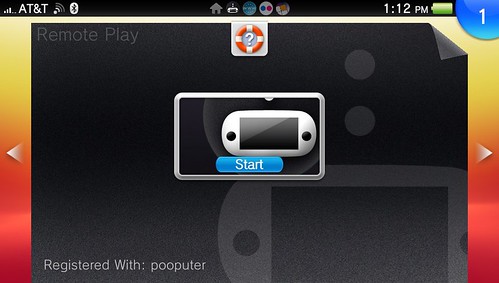
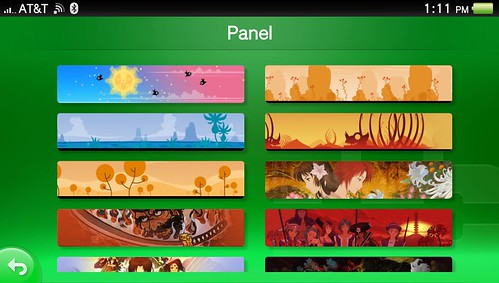
6. Slip into something more comfortable. PS Vita enables you to adopt a custom panel to add a little flair to your PSN presence. To change your PSN panel, navigate to Settings, PSN, Account Information, and Panel to choose from a wide assortment of artwork from first- and third-party games.
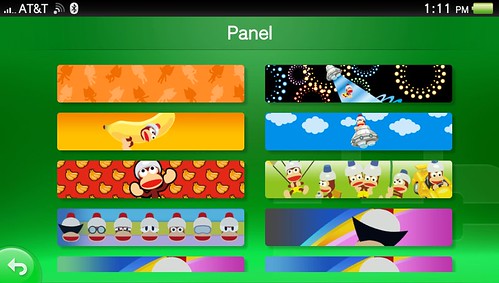
7. Remote Play renaissance. Ever wish you could log into your PS3 remotely to access a video or initiate a PlayStation Store download? This handy feature isn’t technically new — it was supported on PSP — but thanks to PS Vita’s monstrous OLED screen and more powerful processors, it’s more useful than ever. Protip: Remote Play is compatible with any PSone games you may have on your hard drive, along with a handful of classic PSN games such as PixelJunk Monsters, PixelJunk Eden, and Peggle.
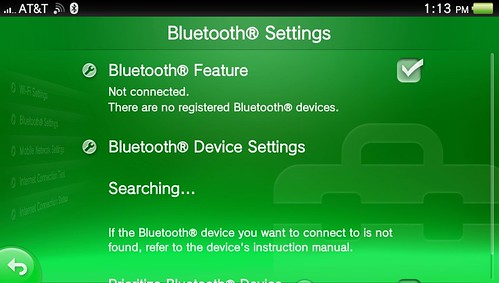
8. Bluetooth bliss. PS Vita supports high-quality stereo Bluetooth for audio output, so if you’ve got a nice pair of Bluetooth headphones (Ahem!) you can pipe in your game audio without restricting wires. In the Settings menu, touch Network and Bluetooth Settings and you’ll be able to pair your headphones to your new PS Vita. If you get stuck on the pairing code, try “0000.” If that doesn’t work, check the manual that came with your headphones (or look it up online) to find the proper four-digit code. Now enjoy a better life — a life without wires!
9. Silence is golden. Some people like soft jazz, others prefer silence. If you want to turn off PS Vita’s toe-tappin’ menu music, you’ll find the option in Settings > Sound & Display > System Music. While you’re there, you’ll notice an AVLS option. This limits the maximum volume when using headphones — perfect if you share your PS Vita with a little one.
These are just starters – use the comments to share any tips or shortcuts you’ve discovered, and enlighten us all, because knowledge is power according to a man called Bacon.












1 2 Next »
100 CommentsAdd Yours
1
Posted on 24 February, 2012 at 4:09 pm by Titchy_Penguin
May have to get some bluetooth headphones once mine die.
2
Posted on 24 February, 2012 at 4:11 pm by Shane_86
another tip: press + and – volume buttons at the same time to mute.
Posted on 24 February, 2012 at 4:19 pm by James Gallagher
You know what – I actually did not know that! Thanks for sharing.
3
Posted on 24 February, 2012 at 4:13 pm by GhostViper
What are the dimension’s for the wallpaper? I want to make some of the pictures I took when I was in London last weekend?
Posted on 24 February, 2012 at 4:25 pm by James Gallagher
Do anything fun while you were over here? I took the second image while I was in Tokyo just before Christmas.
4
Posted on 24 February, 2012 at 4:15 pm by Shane_86
960×544
5
Posted on 24 February, 2012 at 4:25 pm by hayzink
any tips on how to get near to work via wifi it just will not find my loaction.
also how come you cant max the brightness in games?
so far i have noticed motorstorm and fifa wont let me set it to max even when plugged in?
Posted on 24 February, 2012 at 4:43 pm by James Gallagher
That’s strange – it works just fine for me on my Wi-Fi unit. Have you tried touching the Near icon at the top-right when you first open the app?
6
Posted on 24 February, 2012 at 4:29 pm by Fongy
Brilliant start, keep them coming!
7
Posted on 24 February, 2012 at 4:30 pm by johnleonhart
I’m the kind of guy that likes to explore his device and figure out everything it can do, but I have now learnt of a couple of new features after reading this article. Cheers James!
Posted on 24 February, 2012 at 4:37 pm by James Gallagher
I didn’t even know about the mute function so I’m hoping to learn a few tricks myself. One thing I’ve learned in this job is that, no matter how much research I do, I’ll never match the combined knowledge base that is our community.
8
Posted on 24 February, 2012 at 4:33 pm by SuperJag86
Also any way to get Minis working on the Vita?
Anytime I try to play the Minis I got for free with PSPlus aren’t working, I keep getting error code C1-2858-3 when I try.
9
Posted on 24 February, 2012 at 4:35 pm by SuperJag86
Also please get a new browser installed, preferably a Webkit one i.e. the Android one or Chrome!
(Sony and Google are pals after all and Chrome is coming to Sony TVs, so why not add Vita/PS3 in the mix too!)
10
Posted on 24 February, 2012 at 4:36 pm by X201
@SuperJag86
Its a know fault. They’re working on it.
See Edge Online or VG 247
11
Posted on 24 February, 2012 at 4:36 pm by ninja_tom
Is there a way to reorder the actual home screens? I can move individual icons just fine but I have my vita games in one panel, then two panels of “settings”, then my psp games, I would like to move that entire panel up to join the rest of the games
Posted on 24 February, 2012 at 4:46 pm by James Gallagher
You can’t reorder them as such but you can insert new, blank panels at the edit screen. Just hold down on any one of your bubbles and then look for the little plus symbol at the bottom right of your first Games panel. Then you can move your PSP games into that, which shouldn’t take too long.
12
Posted on 24 February, 2012 at 4:38 pm by X201
@SuperJag86
Here
http://www.edge-online.com/node/41477
13
Posted on 24 February, 2012 at 4:41 pm by Ti_dus
I love Vita but when I play it, people on PS3 should see that I’m logged in…and my Vita trophies
It works very poorly… any updates?!
14
Posted on 24 February, 2012 at 4:44 pm by money_man
With regards to point 3, with 2 types of wireless technology in place, shouldn’t these backups be able to be done without having to plug in a usb cable?
15
Posted on 24 February, 2012 at 4:51 pm by hayzink
@James Gallagher
sure have and it always fails to get location, i have been trying and trying.
its not just me theres a few threads about it on the forums but no one seems to know how to sort it
dont even know if ill use near but would like to see it first hand before i decide.
on a side note, when the super fun pack(or whatever its called) goes on sale for frobisher says will this add trophys to the mix for the game because there does not seem to be any atm.
thanks in advance james
Posted on 24 February, 2012 at 5:00 pm by James Gallagher
Hmm, that’s a shame. Let me look into it further for you over the weekend. As far as I know, there are no plans for Frobisher says trophies (technically it’s a ‘Discovery App, as opposed to a ‘game’)but that doesn’t make it any less brilliant!
16
Posted on 24 February, 2012 at 4:57 pm by Hell-Raiser-85
Will we get a app like the one on iPhone and whens Netflix coming?.
17
Posted on 24 February, 2012 at 4:58 pm by commuterzombie
Some good tips there, thanks! Do you know if there’s a list anywhere of the games that support remote play? Is there any chance of this being more widely supported?
18
Posted on 24 February, 2012 at 5:00 pm by jonny_hart_digit
I used remote play and is ace. I managed to switch on ps3 and access video from my couch using both network and internet. but when I tried it from work it did not work. unfortunately I could not trouble shoot as I was at work.
19
Posted on 24 February, 2012 at 5:04 pm by manutreble
i want 1 now it looks so awesome how u change the background & lock screen just 1 ? About the 3G is it free after u bought the sim card or u do u have to top up ever month
20
Posted on 24 February, 2012 at 5:20 pm by VorteXLP
I would really like Sony to focus more on Remote Play since this is is one of the most underestimated yet coolest features of the Vita. Here are some ideas I hope you pass on to the appropriate teams:
- Scale up the PS3 video stream quality to take full advantage of the Vita’s OLED-screen
- Bring up the Vita software touch keyboard when the PS3 keyboard should normally open
- Allow us to play PS3 games; all of them. Extra Vita-touch features are not needed: it’s not rocketscience, Sony.
Thanks!
21
Posted on 24 February, 2012 at 5:23 pm by jin_kazama56
can’t wait getting a vita tomorrow!! hope a monster hunter come’s out for it
22
Posted on 24 February, 2012 at 5:39 pm by jetpacksheep
I wish some games wouldnt cap the brightness at like 80% motorstorm and modnation do but uncharted doesnt, hopefully sony can sort his out as well as remote play for killzone 3. oh and @21 there is a monster hunter in development for vita
Posted on 25 February, 2012 at 5:08 pm by James Gallagher
I guess it must be an optimization thing – trust me, developers want their games to look as great as possible and any steps like this will be taken with this view. Personally, I’ve never taken my brightness past halfway and everything looks stunning.
23
Posted on 24 February, 2012 at 5:40 pm by jetpacksheep
@20 i couldnt agree more
24
Posted on 24 February, 2012 at 5:43 pm by bap10
Cool, didn’t know about the PSN panel.
Can someone please tell me how to change the picture for the lock screen. Cheers.
25
Posted on 24 February, 2012 at 5:46 pm by yen-cid
another fun little trick that Gaf found out, You can use transparent backgrounds on a PNG image and the wave will work behind it. Fun things.
Posted on 25 February, 2012 at 5:08 pm by James Gallagher
This is great to hear (I didn’t know) and I’m going to play around with it.
26
Posted on 24 February, 2012 at 5:47 pm by vonhammer
I’ve got a tip.Please stop using that game changer tag,it makes me want one even less.
“- Allow us to play PS3 games; all of them. Extra Vita-touch features are not needed: it’s not rocketscience, Sony.”
It is if you want no lag when streaming games.
Off topic.I spoke with a dev who is implementing Youtube recording into their game,I asked some tech questions,and found out it has zero impact on performance.I always believed that after Play TV launched.
James,I’m not sure how much sway you have,but with the new Play memory vid editor,and a new gen of home systems a year or two away.Is there any possibility of pushing universal vid recording.
So many people are forced into buying expensive hardware for a function PS3 can do now,and has as part of the SDK.
If you guys could pimp that feature towards the FPS crowd,you have a potential game changer.Add the new edit software,put VO options in it,allow YTHD uploads and you’ve a great console exclusive feature.
Posted on 25 February, 2012 at 5:10 pm by James Gallagher
I agree that it’s a great idea but all I can do is pass on the knowledge that our community would love such a feature. No promises.
27
Posted on 24 February, 2012 at 5:50 pm by uncleniccius
I had the same issue as #5 and I think it was either because I was in a more remote area; or was on slower internet before; (I wasn’t at my house) when I tried it at home, it worked fine.
28
Posted on 24 February, 2012 at 5:54 pm by TomBombFR
I learned a couple of useful tips I didn’t know thanks to this article. Thanks James!
Loving the fact you can take screenshots! That’s awesome!
29
Posted on 24 February, 2012 at 6:05 pm by SuperJag86
@X201
Thanks, I just wanted to know that they’re working on it.
Hope PSone games are supported soon too
30
Posted on 24 February, 2012 at 6:07 pm by ABTR
Thanks for the tips, the custom panel is really cool and i want to see this for ps3
31
Posted on 24 February, 2012 at 6:15 pm by TalzUK
Hey. I am having same problem with Near over WiFi. Its taking me all over the country for no apparent reason. I fant find my local gamers due to it thinksvim 200 miles away. Turning on only 3g fixes this for a while intill you update your location again through WiFi. Please Help!
32
Posted on 24 February, 2012 at 6:22 pm by FIGHTFULL
I know you can turn the system music off, but is there anyway to turn the store music off?
33
Posted on 24 February, 2012 at 6:23 pm by Moonwalker1982
About the PSP game options. Is this done in the main menu of the Vita? I don’t really get it. I have YS Seven downloaded from PSN for example, what do i need to do to get to those options?
34
Posted on 24 February, 2012 at 6:28 pm by Opt1mus76
Has winner of Ultimate PSVita Bundle been announced?
I’ll happily accept Vita instead of my ridiculously overdue Renegade Ops code
35
Posted on 24 February, 2012 at 6:46 pm by optimusprym8UK
You can set any photo as your lock screen image by going to photos > album and then when viewing teh one you want to use, press the (…) button in lower right corner and choose “Use as Start Screen”
36
Posted on 24 February, 2012 at 6:47 pm by X201
James, I can’t transfer my GT5 photos from the PS3 to Vita.
Have managed to copy some photos OK, but not the GT5 ones, it attempts it then fails.
Also quite a lot on my photos fail to generate as a preview on the Vita, so I have no idea what I’m copying anyway.
And whilst I’m preparing a list of photos to copy over, it lets me open the images and see them full size, but only once. Any subsequent viewings give me a giant question mark.
Any chance of passing this on to the techies please.
Thanks
37
Posted on 24 February, 2012 at 6:48 pm by X201
that should have been “…quite a lot *of* my photos…”
Any news on the edit button?
38
Posted on 24 February, 2012 at 7:06 pm by bigjob85
Hi,
I seem to have a little bit of trouble with the game Tales from Space Mutant Blobs Attack. It gives m the error code (C2-12383-7)
I have tried using the content manager and re-downloading but to no avail. Any word on when this will be fixed. Cheers.
Posted on 25 February, 2012 at 5:06 pm by James Gallagher
Looking into this.
39
Posted on 24 February, 2012 at 7:46 pm by Skydancerx
9. When disable Music the Music is still on in the Store. Thats really annoying.
40
Posted on 24 February, 2012 at 7:52 pm by chrisandsheva
@ James,
Are you a mind reader.?.. seriously, i Was going to post, prob in tomorrows blog re-cap that i would like to see a weekly ‘users help thread’, where you could just maybe open a blog for ‘this’ community to ask and answer some questions.. but it looks like your allready on top of it with this one.. Hopefully though this kind of thing will continue.. its just that i Know that most every ps problem has a solution by the users of eublog. Though tbh getting them to share isn’t allways easy, But maybe if, like the weekend-debates you could offer some incentives for best tip/solution, or most helpfull/thoughtfull contributors it may have a chance,? ..some good vita info here, more please.
Posted on 25 February, 2012 at 5:05 pm by James Gallagher
I do enjoy the collaborative nature of posts like these.
41
Posted on 24 February, 2012 at 8:09 pm by VorteXLP
@Skydancerx: Go to Settings app > Audio > Turn System Music off. Or something like that
42
Posted on 24 February, 2012 at 8:11 pm by chrisandsheva
@Skydancerx
it is Very annoying music to boot, but won’t that tip from top of page help?.. press vol + and – at same time to mute sound. or does the music still play through that.. haven’t tried myself yet as when i do turn vita back on i will be to busy to post, check the blogs etc.
The Only question i need answereing at the moment is the vitas browser.. mine can’t seem to display a full page,..ie when i scroll down/up it greys out for a bit before returning into view, so is this normal. or is mine damaged, not sure which answer i’d like to hear tbh.. but if anyone can comment it’ll be appreciated.
43
Posted on 24 February, 2012 at 8:32 pm by chrisandsheva
oh ok, one more question before i get back to uncharted.. concerning trophies and online ‘psn’ status when i am on vita but friends are on ps3.. Does anyone know if this happens in Japan?.. or are they in same situ.. Only they’ve had 3 months now and i’m sure the trophy hunters there won’t be pleased if there psn/ps3 friends cannot see them playing the vita, and worse there not able to show off any earned trophies in their ‘main’ trophy list/card… i mean i was told i could earn trophies in vita games, and ‘assumed’ that meant add them to earnt ps3 trophy list, but if i now find out this is not true then that’ll be my 1st regret of picking launch model..so i hope i am just jumping the gun and All will be as i ‘assumed’, . also imo its biggest concern after remote play ‘worries’
44
Posted on 24 February, 2012 at 8:50 pm by RJRH18
Are we able to play playstation titles on the go with this new portable?
45
Posted on 24 February, 2012 at 9:35 pm by chrisandsheva
@ RJRH18
No not at the moment, apart from minis,, but someone posted earlier that a new firmware is going to let us transfer ps1 games over, though it will be up to 4 weeks before it happens… personally i’m not that interested in minis or ps1s, but may change my mind after trying them on a handheld.. i just want to play psn/ps3 digital downloads on it, unfortunately sce ‘have no plans of introducing this feature’.. It’s still very early days etc, but some good looking vita games will be adding to the launch ones,, plus imo when the cod game hits the vita sales will jump, and hopefully bring even more devs on the scene.
46
Posted on 24 February, 2012 at 9:43 pm by geronimo73
Remote Play now is not able to play any PS3 games !!!!
Gran Turismo 5, Killzone 3, Uncharted 3, inFamous 2, LBP, Battlefield 3, no one!
Why and When I can use it ?
47
Posted on 24 February, 2012 at 10:56 pm by xDeathAwaitsU
A tip to be able to manage my memory card would be good 16gb filled and i cant find anyway to manage it without a pc
48
Posted on 24 February, 2012 at 11:38 pm by S-E-G
when you first implemented facebook to ps3 you said it’s just the beginning and we have not seen anything else since then and i feel like the facebook feature you gave us was to use us to advertise your games for free
is there a reason why Microsoft received a Crackle app for XBOX before ps3 psp and vita? it don’t work for me in your playsation home!!! i want a functional app damn it lol unbelievable
you said you got rid of otherOS because you wanted to focus on your own OS, when will we see results of that? it’s been the same for 5 years exception for the many playstation store shortcuts you added
i have lost complete faith and trust in you Fony, you use to be the innovators now you are just waiting for nintento or microsoft and google to rip off ideas
i think i’m catching on to your Make.Believe B.S
49
Posted on 25 February, 2012 at 12:41 am by Dante_Zero
yup james i definately noticed you’ve been playing about with your vita abit and am enjoying being competative against your times on Motorstorm RC. You got skillz.
)
Posted on 25 February, 2012 at 5:04 pm by James Gallagher
Thanks! I still play a LOT of Micro Machines on my N64 so that has held me in good stead!
50
Posted on 25 February, 2012 at 1:03 am by ChrisEngdahl
PLEASE RELEASE THE NETFLIX APP IN THE EU STORE FOR ALL US EUROPEANS WHO LIVE IN THE US AND STILL HAVE (AND SUPPORT) A EU ACCOUNT!!!! I hate that I can’t put 2 accounts on my PSVita, stupidest decision ever. These decisions is the reason why people hack Sony’s machines. I am sorry to say it but it really upsets people. Even a simple guy like me who actually pays for my stuff. I just want NETFLIX NOW!
1 2 Next »
We close the comments for posts after 30 days. If you would still like to comment on this post, please use our contact form.