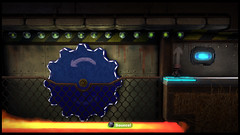
The wait is finally over and the LittleBigPlanet 2: Cross-Controller Pack is out today! This brand new pack lets you use your PlayStation Vita as a controller in LittleBigPlanet 2 allowing you to play the game in a totally new and exciting way.
Check out the new trailer for the LittleBigPlanet 2: Cross-Controller pack to see just what adventures Sackboy will be getting up to in this new pack!
Not only will you be able to play through Sackboy’s grand new adventure, we’ll also be giving you a brand new set of tools and other goodies to enable you to make your very own LittleBigPlanet 2: Cross-Controller levels!
What’s in the LittleBigPlanet 2: Cross-Controller Pack?
Sackboy’s latest adventure is chock full of a wonderful array of goodies that we know you all can’t wait to hear to find out about, so here’s a rundown of just what you’ll be getting!
- A brand new story – We have a brand new theme that will see Sackboy travelling across the Omniverse to discover the lost treasure!
- Five costumes – Sackboy will be fully kitted out for his new adventure with five brand new costumes! Don’t forget about our Cross-Buy Costumes! If you purchase this pack, these costumes will also work on LittleBigPlanet PS Vita and will become available in LittleBigPlanet Karting in a future update!
- Four new tools – The Worm Hole, the Vitanator, the Remote Tag Sensor and the Tag Radar are all available to help you create your own Cross-Controller experience.
- Creative goodies – 26 Objects, 25 Materials, 74 Decorations, 148 Stickers, three interactive music tracks and one background are all waiting to be picked up by your Sackboy to add to their Popit to help fulfil their creative needs.
- Five tutorials – Finishing up the Cross-Controller Pack, we have five brand new tutorials all voiced by LittleBigPlanet’s favourite narrator, Stephen Fry. These should really help you get to grips with the new tools and Sackboy’s headfirst dive into Cross-Controller gameplay!
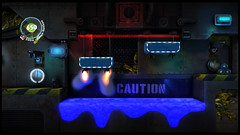
What is a Worm Hole?
The Worm Hole is Sackboy’s brilliant new teleportation tool that will enable him to travel safely from one Worm Hole to another within the same level without fear of losing a life. This handy new tool will even allow Sackboy to teleport from your PlayStation 3 to your PlayStation Vita and vice-versa, should you want him to return home!
The most intuitive and creative level designers will even be able to use the tool to remove Sackboy from gameplay and effectively lock him in a state of stasis whilst action is taking place elsewhere in the level…
However we’ll leave it up to you and Sackboy to discover just what potential his new Worm Hole discovery holds for LittleBigPlanet and the rest of the Omniverse!
Head on over to the Store today and you can pick up the LittleBigPlanet 2: Cross-Controller Pack for £3.99/€4.99.

Help Sackboy save the day in his new adventure and then use your newly collected goodies to create your own levels. We can’t wait to see just what kind of Cross-Controller adventures our creative community can design!









« Previous 1 2 3
132 CommentsAdd Yours
101
Posted on 20 December, 2012 at 9:51 am by Kurupt_El_Don
@Skookie30 and Tod_UK i know how it feels been like 3 or 4 hours just to figure it out..all you need to do is to read the post nr 46 and it will work..any doubts let us know.
102
Posted on 20 December, 2012 at 10:02 am by niwrA
I got it to work with both my PS3s, and with both the Digital and the Retail version.
Let’s see if I remember the correct procedure:
1. On your PS3, make sure your Vita is registered for your PS3 with Remote Play. I did this over a private network, using WiFi.
- For this, go to the settings menu on the PS3 and choose register remote play devices, and then Vita. You should get a code to type in on your Vita.
- Next, start up Remote Play on your Vita, click the three dot menu in the bottom right corner, choose settings, then register with PS3.
- Now you should be able to type in the code that is shown on PS3.
Even if you think you’ve done this before, you may want to do it again.
2. Start up LBP2. If there are any updates, it will install these now. My digital version on my one PS3 was up-to-date thanks to Plus. The retail one I started on my other PS3 wasn’t, and had to install 9 updates, the last of which was 1GB.
3. Go to the Store, and buy and install the Cross Controller DLC. This should give you basically two unlock keys, as the content for the update was in the last LBP2 patch you installed under 2.
103
Posted on 20 December, 2012 at 10:02 am by niwrA
4. When it’s done installing, go back to your pod, and choose the ‘Cross Controller’ option. When you get to the screen where it says start up Cross Controller on your Vita, go to your Vita and on the Remote Play home screen, press the Cross Controller icon instead of Remote Play.
5. Click Next on Vita. It should find the PS3 and move to step 2, where it starts downloading the LBP Remote Play app for your Vita. Once that’s completed (something like 463MB), it will go to step 3 and prompt you to exit the Cross Controller App. Press the Home button on your Vita, and you’ll see the LBP Remote App installing immediately.
6. Start this App on your Vita. Now you can start playing the Cross Controller levels on PS3.
From the top of my head, but I think that’s it. Let me know if I missed something.
Incidentally, when I tried this with my other PS3 and the Retail version, it needed to download and install the LBP Vita Remote Play app again before it could work.
104
Posted on 20 December, 2012 at 11:50 am by Tod_UK
@Kurupt_El_Don My Ps3 and Vita are in the same ip range, have same default gateway, same DNS servers, same subnet. Still does not work.
105
Posted on 20 December, 2012 at 12:01 pm by Skookie30
I total give up I try once more it went to 340mb then it resets fail now it just not passing the KB stops at 7691kb & the 1st message shows again.
106
Posted on 20 December, 2012 at 12:04 pm by Skookie30
It funny when my vita is type2 near works now I had issues of the past when my vita was stuck in nat type 3.
I shall try later it could be the servers too being busy.
107
Posted on 20 December, 2012 at 2:18 pm by Bumblebee
I tried for AGES last night to get this working.
I’m in IT support so I’m no noobie to networking etc. yet still this baffled me.
First problem was finding the content on LBP2. Eventually found it under “My Stuff” in the store.
Vita has been linked for Remote Play since day dot but after failing to connect last night, I re-did it and set up Vita on a static IP address with network settings same as for PS3 (besides the assigned IP address).
Basically get as far as “Start the Cross Controller app on the Vita”, then where I’m supposed to get an app come down, it won’t… Got no messages that anything is downloading, no errors, just a churning connection icon.
Got about 520MB free space left on my 32GB card. Please don’t tell me I need more. And if I do need more, er, then it should tell me.
This is PATHETIC, by the way. Once again Sony have messed up something that should be dead simple.
Can’t we AT LEAST have Remote Play for LBP2?
108
Posted on 20 December, 2012 at 2:42 pm by Ornigon
Hi,
I’m a little confused with all the different terms being used.
Does this post mean that I will be able to play the single campaign of LPB2 on my vita using remote play or only to use the vita as an extra controller for only a selection of community made levels? How does this work?
Thanks for the clarification
109
Posted on 20 December, 2012 at 2:52 pm by B_BOPPER
@Kurupt_el_don no i aint got it working have tried everything done the network checks and even changed the last digit on ip address as another site stated i feel with all these problems people are having somebody from playstation should be on with a step by step guide my remote play works fine so both consoles are on the same network if i have missed something could you help me please.
110
Posted on 20 December, 2012 at 2:57 pm by B_BOPPER
@ziaro_7 my ip address on ps3 ends in 10 so do i change it to 11 and keep it at ten on the vita please help.
111
Posted on 20 December, 2012 at 3:16 pm by Bumblebee
Isn’t it nice how Sony flog us something then eff off and leave us to work out how to get it running?
COME ON SONY/MEDIA MOLECULE/SANTA.
GIVE US A FLIPPIN’ CLUE.
112
Posted on 20 December, 2012 at 3:55 pm by TheMART
@ B_Bopper
Did you stop trying to install the cross controller bubble/download on the PS3 to the PSVita?
I get the feeling you want to have the cross controller app the wrong way.
On every PSVita there on the main screen the Remote Control app out of the box. You need to enter that app and then select ‘Cross control’ at the right side, etc etc rest of the stuff as said in previous posts.
I get the feeling that many people think they’re getting stuck after downloading the LBP2 Cross Controller DLC from PSN and then think the cross controller bubble will pop up after transferring the file on PS3 to PSVita, which isn’t where the 482MB Cross Controller app comes from…
I had it up and running in one try and I ain’t an ICT employee or whatever.
113
Posted on 20 December, 2012 at 4:02 pm by B_BOPPER
@TheMART no give up with the bubble lol its only costumes i think.Its the cross control vita to ps3 from game i tried it all wired unwired its like my vita and ps3 wont combine wirelessly for cross control yet the remote play works i thought it would just be go on game press cross controller boot up vita remote play then press cross controller then it works as they say it doesn’t do what it says on the tin lol.
114
Posted on 20 December, 2012 at 4:57 pm by Bumblebee
Just to confirm with the people who think the people who are failing are being stupid.
When I choose Cross Controller on the Vita, after getting the message on the PS3 to run the Cross Controller function on the Vita (via the Remote Play icon) [in order to download the correct file], I get no response from the Vita.
Just a churning icon trying to connect;
No messages of 483MB files needed;
No error messages;
Just a churning, churning icon.
This despite my Vita & PS3 Network settings being perfect; and Remote Play works without issue on the [VERY] few programs that use it.
£4 I paid, and a whole night I wasted trying to use the ruddy thing.
Perhaps I need 483MB x 2 space on my Vita card for this? 483MB for the download and 483MB space left after download to install it?
Perhaps this is the case? IF SO CAN SOMEONE FROM SONY SHED SOME LIGHT ON THE SITUATION PLEASE?
115
Posted on 20 December, 2012 at 5:05 pm by B_BOPPER
@TheMART cheers pal thanks for the help ive done it downloading now also thanks to Kurupt_EI_Don for your help if anybody does not understand let me know i can put it in lamens terms for you.
116
Posted on 20 December, 2012 at 5:10 pm by B_BOPPER
@Bumblebee all you do is change your ip address on your ps3 your vita stays the same as it was for instance my last digits on the ps3 were 10 i changed to 11 and kept the vita last digits at 10 then all the settings router gateway/dns stay the same write them in your vita settings and voila!!!remember your only changing the ps3 ip adress by 1 vita stays as original let me know if it works for you mines downloading now i god i have struggled ask TheMART lol.
117
Posted on 20 December, 2012 at 5:28 pm by andrew30101978
Well i spoke to sony today where they say for some customers who got it working that was lucky. They identify a issue where the vita file cant install direct as it has no where to go and will require to be remedied
118
Posted on 20 December, 2012 at 5:39 pm by TheMART
@ Bumblebee
Did you try it with the PSVita connected to PS3 with an USB cable too, not just wirelessly?
ANd B_Bopper
CONGRATS MATE! Enjoy that LBP2 DLC pack tonight, so it was just an IP problem at your side?
No problemo, good to see we all together try to solve it for everyone to enjoy this.
But Sony should really make this process easier, with a problem solving app on both PSVita and PS3 that can do some checks maybe for IP etc. Something like how the Network check is done. I dunno. Make it easier, to many people are struggling.
119
Posted on 20 December, 2012 at 6:03 pm by B_BOPPER
@TheMART thanks yes been on it no problems your right its disgraceful that sony aint jumped on this problem yet but like you said everybody helping is good to see maybe i’ll be able to help with a problem next time to everybody else dont give up and read the posts if your struggling ask for help its ther if you need it.
120
Posted on 20 December, 2012 at 10:34 pm by Tod_UK
I have found out what stops mine working – basically the PS Vita must have a manual IP address, it can not be set on automatic.
I have done a step by step guide here: http://community.eu.playstation.com/t5/LittleBigPlanet-PS3-PS-Vita/Cross-Controller/m-p/17828606#M82400
121
Posted on 20 December, 2012 at 11:31 pm by TheMART
My PSVita is on automatic, no manual IP adress and its working.
I guess when its not working on DHCP set it to manual then.
122
Posted on 21 December, 2012 at 12:10 am by Tod_UK
Yeah, maybe it is something to do with my router. I am on Virgin Media Superhub – maybe something to do with that. Would be interesting to hear what others are using with the fault.
123
Posted on 21 December, 2012 at 2:48 pm by B_BOPPER
@Tod_UK I am on virgin media superhub its not the router that is the problem its the ps3 network settings you can change the ip address there THAT is all you need to change like i said in an earlier post(on the ps3 change the last digit of your ip address example if it is 10 change it to 11 but keep the original ip address on the vita so keep it at 10 before these steps to enter manually make a note of default gateway,primary dns and secondry dns the others stay as they were rewrite all them in manually even on the vita Manually.the vita ip and ps3 ip have to be different by 1 number on the last digit or it wont work once done load up lbp 2 nothing else then go to cross controller follow instructions load up the vita remote play then cross control WIRELESS and it will download if all the steps are correct dont forget change ip address on ps3 only last digit by 1 vita stays the same nothing else.
124
Posted on 21 December, 2012 at 3:02 pm by Bumblebee
My PS3 aand Vita have both been set up with manual IP settings.
Why on Earth would changing the IP address of my PS3 by 1 make any difference? I have it all set up correctly anyway.
I do networking stuff ALL THE TIME, EVERY DAY for my job so I know what I’m doing when it comes to network settings.
What we really need is SOME HELP FROM SONY.
125
Posted on 21 December, 2012 at 4:21 pm by DZORMAGEN
LBP Cross Controller STILL NOT WORKING!!! I WANT MY MONEY BACK SONY!!!! Keep fooling your customers!! THIS IS THE LAST TIME I BUY ANYTHING FROM YOU GUYS!!!
126
Posted on 21 December, 2012 at 7:10 pm by B_BOPPER
@Bumblebee maybe your right i’m a mechanical engineer and didn’t have a clue have you tried changing it yet it works have a little faith i thought the same mine was set up perfectly but itdoes work with no difference to the wireless connection just try it!
127
Posted on 21 December, 2012 at 7:16 pm by B_BOPPER
@Bumblebee read post 46 if your in I.T it should be a doddle understanding it.
128
Posted on 21 December, 2012 at 7:21 pm by B_BOPPER
@billy-beauts read post 46 the bit about the ip addresses and changing by 1 it works i did it last night with no problems and i was really struggling.
129
Posted on 23 December, 2012 at 9:28 pm by RazerBlue6
Hi, Steven, can you give me an awser on one question? I’ve spend €5 on this pack, you’ve said we’d get three interactive songs, but instead, I only can find one. Where are the other two? I really want an anwser. And if they are in the pack, please tell where they are!!!
130
Posted on 27 December, 2012 at 7:17 am by man-of-cake
I just completed the and 100% and aced all the levels, but when I went to see what I collected I noticed that 2 interactive tracks were missing…is that some sort of glitch?
131
Posted on 28 December, 2012 at 1:37 am by Noony
Ok Guys here’s how I’ve finally got it to work after a few head banging hours!
On your PS3 go to network settings and look for your ip address 192. . . Ect (don’t change this)
Now on psvita go to network settings and start copying from ip address down (default gateway, primary,secondary ect) make sure they match!!!!
Now follow sony’s rubbish instructions and it should work!
Come on Sony you should of worked this issue out and posted something by now!
132
Posted on 5 January, 2013 at 5:38 am by Mennenth
I guess I’m one of the lucky ones that got it working with no hitch first time. But I’m going to complain anyway.
Why is cross controller done over wifi?! Seriously. Remote play can be done over private connection between the vita and ps3, the regular controllers are via bluetooth, data management is via usb, yet the one thing that allows the ps3/vita to make the wiiu look old despite being the newest gaming device on the market, is crippled by needing an external 3rd device that can get bogged down when network traffic is heavy, leading to death by input lag?
And of course its executed poorly. What with this whole ip mess and needing to not only be on the same router but also the same network.
Its a really good idea. However, the execution of the idea has been total crap.
Should have utilized the remote plays “private connection”. Would have made the whole process of getting it set up far easier, and wouldnt require a 3rd device to handle the communications between the 2.
« Previous 1 2 3
We close the comments for posts after 30 days. If you would still like to comment on this post, please use our contact form.